 Optencis

Optencis is an affiliate of Pocket Option. Regulatory status and how we work
Pocket Option offers an Islamic account for traders who want to trade in line with Islamic finance principles. It is not a separate account to open: it is a setting of your existing account, which you switch on or off in a few seconds. Here is what it changes, who can use it, and how to turn it on.
What the Islamic account changes
In the platform settings, the option is described as a way to trade “in compliance with Islamic finance principles”. In practice, turning it on removes from your asset list the markets that do not align with these principles. The assets that remain work as before: same trading screen, same way of choosing the amount, the duration and the direction.
Because some markets disappear, check your asset list after switching it on. If an asset you used to trade is gone, the setting is the reason.
Who can use it
- Everyone: any user can turn it on, with no condition and no request to make.
- At any time: you can turn it off just as easily, and turn it back on later.
The option is there for those who want it. Whether trading, and binary options in particular, fits your own beliefs is a personal question: Optencis gives no religious opinion. If it matters to you, ask a qualified scholar you trust.
How to turn it on
- On the trading screen, open the Settings menu.
- Scroll to the bottom of the list, below the Trading section.
- Switch on Islamic account. To go back, switch it off in the same place.
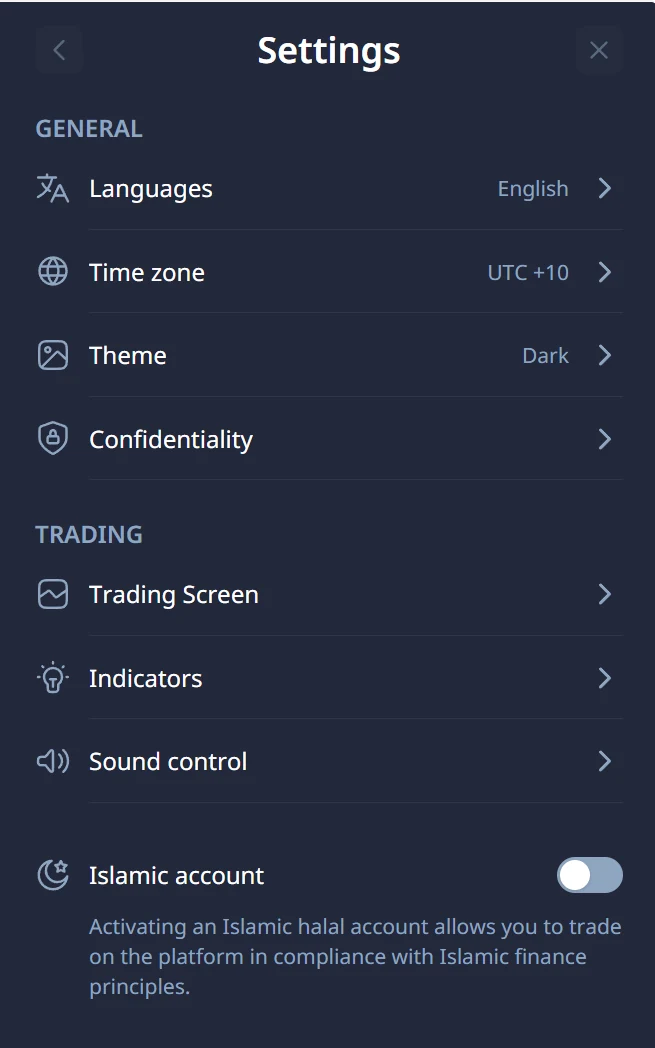
Then open the asset list to see which markets are still available to you.
What does not change
The setting changes which markets you can trade, not the math of each trade. A win still pays less than 100% of the amount and a loss still costs 100%: at a 92% payout, you need to win 52.1% of your trades just to break even. See the break-even win rate.
The usual rules apply too: practise on the demo account first, risk 1 to 2% of your capital per trade (how much to invest per trade), and set a daily stop.
Frequently asked questions
Can anyone open an Islamic account on Pocket Option?
Yes. It is a setting available to every user, with no condition: you switch it on in the platform settings.
Can I turn the Islamic account off?
Yes, at any time, in the same place. You can switch it on and off as often as you like.
Why have some assets disappeared from my list?
With the Islamic account on, the markets that do not align with Islamic finance principles are removed from the list. Turn the setting off and they come back.
Is binary options trading halal?
Optencis gives no religious opinion. The setting exists for those who want it; for the question itself, ask a qualified scholar you trust.
Read our binary options guide for the basics. Binary options are high-risk products: you can lose all the money you invest.